
Turn any video into MP3.
Pick videos from Photos or Files and convert them on your phone — MP3, M4A, WAV or FLAC in one tap. Fast mode copies the original audio in seconds, and nothing is ever uploaded.
- 4formats, your quality
- 0.1 strim precision
- 30languages
Works offline · On-device · Batch & trim
Why Video to MP3
The audio out of any video, in the format you want, with the controls you actually need.
Four formats, your quality
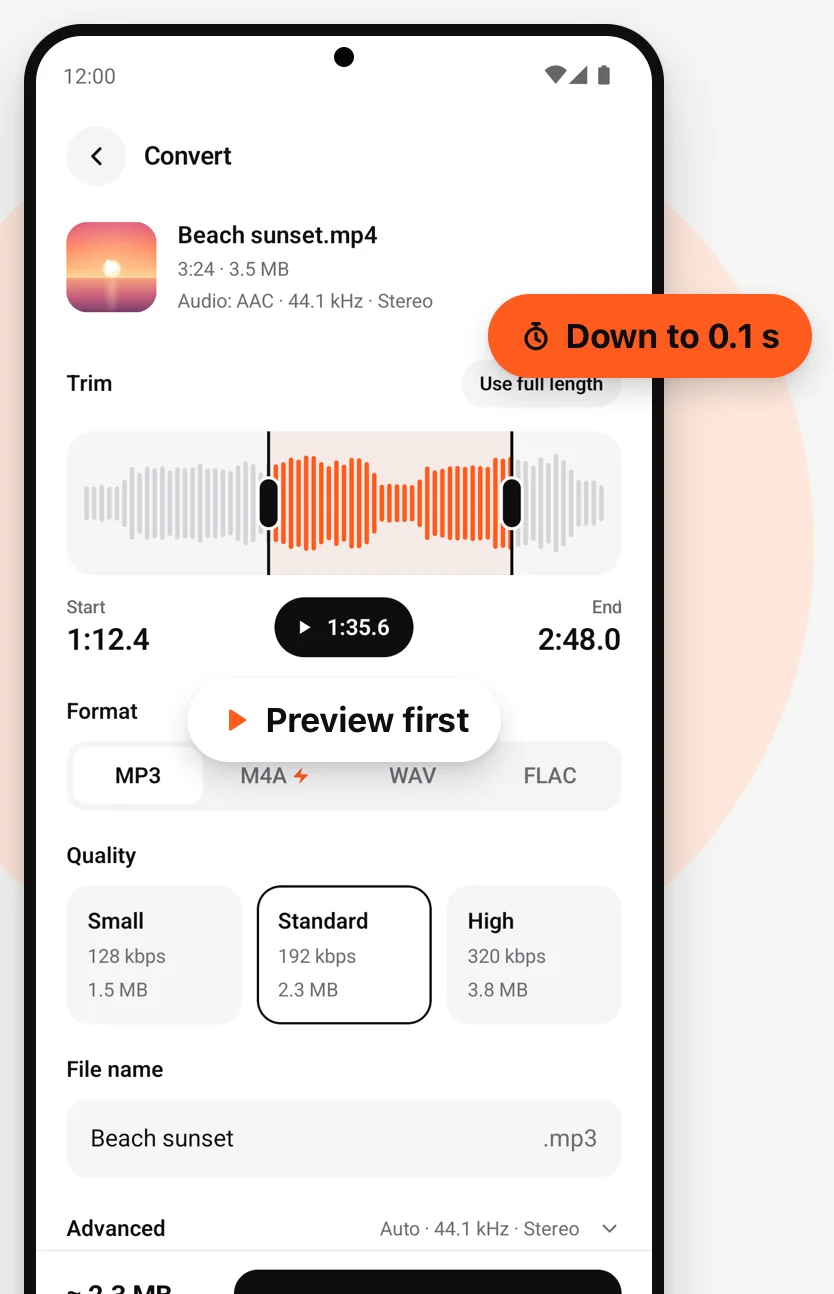
MP3, M4A, WAV or FLAC in one tap. Three presets — Small, Standard and High — with the file size shown before you convert, so there are no surprises.
Fast mode, done in seconds
Copies the original audio track straight out of the video without re-encoding. Nothing is lost, and it is over before you have put the phone down.
Keep only the best part
Trim on a real waveform down to 0.1 s and preview the selection before you convert. Use the full length with one tap.
A whole batch in one go
Pick many videos at once, set one format and quality for all of them, and one tap converts the lot.
Keeps going in the background
Leave the app and carry on with your day. A notification tells you when the file is ready.
Make it your ringtone
Set a converted file as your phone ringtone, notification sound or alarm in one tap.
On Android.
Also in the box
The small things that make it feel finished.
How it works
Three taps, a few seconds.
Pick videos
From Photos or Files. One to trim, or many at once.
Choose format and quality
MP3, M4A, WAV or FLAC, then Small, Standard or High with the size shown first. Fast mode keeps the original track.
Convert
It keeps going in the background. Then play it, share it, or set it as your ringtone.
Private by design
Everything is converted on your phone. Works offline. Nothing is uploaded.
Converted on your phone
Reading the video, encoding the audio and saving the file all happen on your device. There is no server in the loop.
Works offline
No connection needed, from picking a video to playing the result. Airplane mode is fine.
Never uploaded, no account
Your videos and audio never leave your phone, and there is nothing to sign up for.
Questions
Which formats can I convert to?
MP3, M4A, WAV and FLAC. For each one you pick a quality preset — Small, Standard or High — and the app shows the resulting file size before you convert.
What is Fast mode, and is it really lossless?
Fast mode copies the audio track that is already inside the video, without decoding and re-encoding it, so the result is identical to the original and ready in seconds. Choosing MP3 re-encodes at the bitrate you pick; WAV and FLAC store the decoded audio without further loss.
Can I keep only part of a video?
Yes. Trim on a real waveform down to 0.1 s, preview the selection, then convert just that part. Trimming works on a single video; a batch converts each video in full.
Can I convert several videos at once?
Yes. Pick as many as you like, set one format and quality for all of them, and convert with one tap. You can leave the app while it works; a notification tells you when it is done.
Do my videos get uploaded?
No. Conversion runs on your phone and works offline. Your videos and audio never leave the device. Details are in the privacy policy.
Can I use the result as a ringtone?
On Android, yes: set any converted file as your phone ringtone, notification sound or alarm in one tap. Phones with two SIM cards let apps set SIM 1 only; for SIM 2, pick the file in Settings › Sound.
Is it free?
You can start converting right away without signing up. If optional paid features are offered, they are described in the app before you buy, and purchases go through the App Store or Google Play.
Keep the sound. Leave the video.
Free to start on iPhone and Android. Pick a video and have the audio in seconds.